GTA 6 AI Prompt Studio & Photo Generator · Pay once, no subscription · Credits never expire Pay once · Credits never expire

Selfie & Portrait Transformer

Photo to GTA 6 AI Prompt & Portrait Generator

Upload a selfie to transform your photo into Vice City cover art, or copy tested GTA 6 AI photo prompts for ChatGPT and Google Gemini (Nano Banana).

  • ✓ Pay once · No subscription
  • ✓ HD PNG · No watermark
  • ✓ Auto-refund on failure
1Upload Selfie or Portrait
2Choose GTA 6 Cover Style
3Scene & Aspect Ratio
2 credits per portrait · Sign in required 2 Credits / Image

Photo to GTA 6 sample output Sample · Vice City Box Art 3:4
Upload a portrait and click Transform to render your own GTA 6 art.
Free ChatGPT / Gemini Photo Prompt


Copy-Paste GTA 6 AI Prompt Library

Filter by scene type and click Copy Prompt to paste directly into ChatGPT, Google Gemini, Midjourney, or our AI generator above.

P01 Box Art Selfie

Classic Vice City Box Art Selfie

Transform the person in my uploaded photo into Grand Theft Auto VI Vice City official cover art illustration style. Preserve exact facial features, hairstyle, and expression. Place them leaning beside a retro pastel sports car on Ocean Drive at sunset, bold cel-shaded ink outlines, painterly shading, neon coral and coastal teal rim light, 3:4 poster ratio, no text or watermarks.

ChatGPT · Gemini · Built-in
P02 Couple Cover

GTA 6 Couple Cover Poster

Turn the couple in this reference photo into a GTA 6 Vice City dual-protagonist game cover illustration. Keep both faces, hairstyles, and expressions faithful to the photo. Style them in Miami resort streetwear leaning on a vintage convertible with palm silhouettes, Art Deco neon hotels, and a magenta-orange sunset sky, crisp semi-realistic brushwork, 3:4 portrait.

ChatGPT · Gemini
P03 Loading Screen

Widescreen Loading Screen Portrait

Convert the subject from my photo into a widescreen 16:9 GTA 6 loading screen painting. Keep the exact face and likeness, add aviator sunglasses and a floral Vice City shirt, set against a blurred Miami Beach boulevard at golden hour with neon reflections, bold black linework and painterly highlights, no UI text.

ChatGPT · Gemini · Built-in
P04 Driver Seat

Ocean Drive Convertible Shot

Restyle the person in my photo sitting behind the wheel of a turquoise retro convertible driving down a palm-lined Miami highway at twilight in GTA 6 official artwork style. Maintain exact facial likeness, dramatic dashboard neon glow, sunset sky gradient in coral and teal, cel-shaded video game illustration, 3:4 vertical.

ChatGPT · Gemini
P05 Pet Portrait

GTA 6 Pet in a Convertible

Turn the pet in my uploaded photo into a GTA 6 Vice City cover art character wearing neon pink and teal shutter sunglasses in the passenger seat of a pastel convertible along Miami Beach boardwalk at sunset. Preserve the pet's exact fur markings and face, bold painterly game-art outlines, 1:1 square.

ChatGPT · Gemini · Built-in
P06 Wanted Poster

Vice City Nightlife Character Card

Reimagine the person in my photo as a Vice City stylized character card in GTA 6 illustration style, standing in front of neon-lit palms and police helicopter spotlights at dusk. Preserve exact facial features, crisp semi-realistic brushwork, high-contrast coral and teal lighting, 3:4 poster framing, no watermarks.

ChatGPT · Gemini
P07 Multi-Panel Cover

Vice City Multi-Panel Selfie Cover

Create a 3:4 vertical GTA 6 Vice City multi-panel box-art cover poster from my uploaded selfie, preserving my exact face, hairstyle, and expression. Feature a bold hero portrait in the main frame alongside smaller Vice City panels of a retro convertible, palm sunset sky, and neon coastline with thick black borders, cel-shaded brushwork, no text or watermarks.

ChatGPT · Gemini (Nano Banana)
P08 In-Game HUD Selfie

Real-to-GTA In-Game HUD Selfie

Transform my uploaded photo into a realistic Real-to-GTA 6 third-person open-world in-game screenshot along a sunlit palm-lined Miami street at golden hour. Keep my exact facial likeness, outfit, and natural lighting with next-gen console graphics, a circular minimap in the bottom-left corner, and 5 glowing wanted stars plus a compact green cash counter in the top-right corner, 16:9 widescreen gameplay view, no watermarks.

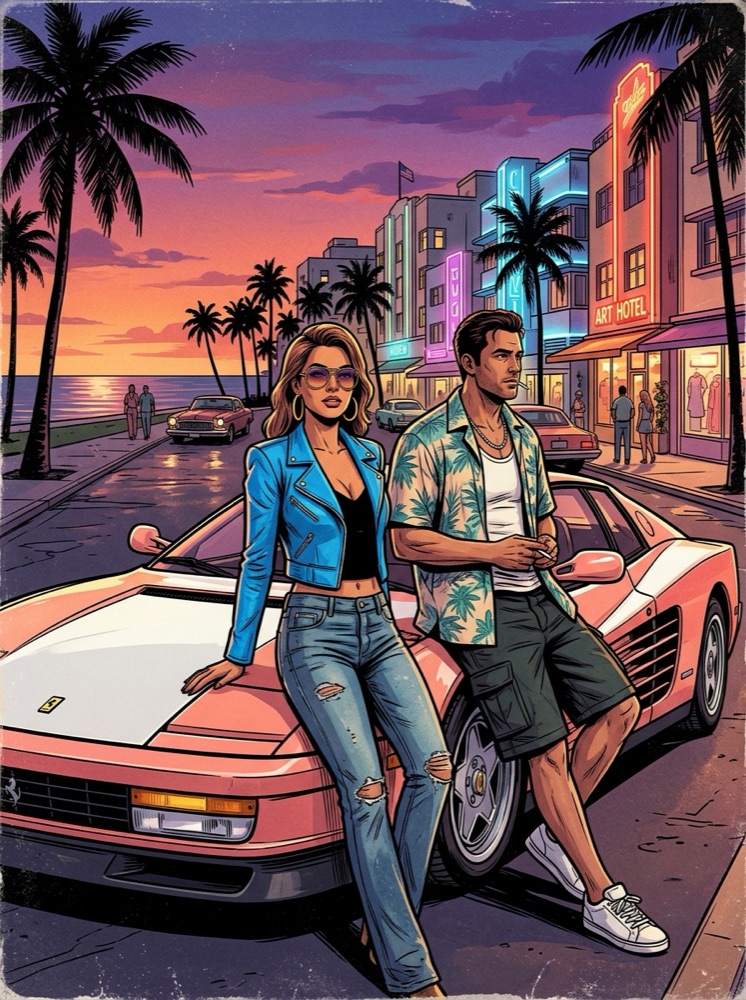
ChatGPT · Gemini (Nano Banana)

How to Turn Your Photo Into a GTA 6 Poster

Turning a real selfie or couple photo into Grand Theft Auto VI cover art takes two ingredients: a clean reference photo and a GTA 6 AI photo prompt that locks in your facial likeness while shifting the brushwork, lighting, and background to Vice City.

  1. Pick a clear, front-facing photo. Even daylight or soft indoor lighting lets the model read your eyes, jawline, and hairstyle accurately. Heavy lens blur, sunglasses covering half your face, or harsh shadows make likeness drift much more likely.
  2. Choose your Vice City frame. Select Vice City Box Art for classic poster framing (or pair it with prompt P02 Couple Cover below for two-person shots), Loading Screen for wide cinematic banners, Miami Neon Street for twilight nightlife vibes, or Wanted Poster for close-up character cards.
  3. Transform directly or copy the prompt. Click Transform Photo to GTA 6 to render through our built-in image-to-image model, or click Copy Photo Prompt to paste the exact formula alongside your selfie inside ChatGPT or Google Gemini.

Photo Framing Tips for Accurate Likeness

Most disappointing GTA 6 AI photo edits fail because the prompt asks the model to invent a brand-new pose from a tightly cropped headshot. Match your upload to the composition you want:

  • Full-body or waist-up shots work best for box-art covers and car-side poses, because the AI can restyle your jacket, shirt, and posture naturally.
  • Close-up selfies work best for square avatars, wanted posters, and loading-screen headshots where facial expression is the focal point.
  • Couple and group photos need explicit subject preservation ("keep both people's exact faces, heights, and expressions") so the generator does not merge two people into one character.
  • Pets and cars respond especially well to cel-shaded Vice City lighting—keep the vehicle or pet centered so the palm-lined Ocean Drive backdrop frames the edges cleanly.

Privacy & 24-Hour Auto-Deletion

Reference photos uploaded to our Photo to GTA 6 generator are transmitted solely to our AI rendering provider to create your stylized portrait and are automatically deleted from storage after 24 hours. We do not publish visitor uploads to any public gallery. Review our full Privacy Policy for details, or return to the GTA 6 AI Prompt Studio to build text-only prompts without uploading any image.

Built-In Generator vs. External AI Apps

If you want one-click Vice City styling without tweaking parameters, our built-in generator applies a tested server-side GTA 6 artbook template automatically. If you already pay for ChatGPT Plus or Google Gemini Advanced, you can copy any of the eight photo prompts above, attach your selfie in chat, and iterate on outfit colors or background landmarks in follow-up messages. Built-in Photo-to-GTA-6 AI rendering is live now at 2 credits per image—sign in with Google and check our Pricing page for one-time credit packs (no subscription, starting at $4.99).

Frequently Asked Questions

What kind of photo works best for a GTA 6 AI photo prompt?

Use a well-lit, front-facing JPEG, PNG, or WebP photo where your face is clearly visible without heavy filters. Waist-up portraits work best for Vice City box-art posters, while close-ups fit square avatars and wanted posters.

Are my uploaded selfies stored permanently or shown publicly?

No. Reference photos uploaded on this page are used solely to generate your stylized GTA 6 image and are automatically deleted after 24 hours.

Why does my face sometimes look different in GTA 6 AI edits?

Include an explicit likeness anchor in your prompt such as "preserve the exact facial features, eyes, nose, hairstyle, and expression of the person in the reference photo" and avoid changing camera angles too drastically.

Can I copy these GTA 6 photo prompts for ChatGPT and Gemini (Nano Banana)?

Yes. Click Copy Photo Prompt right inside the tool, upload your selfie into ChatGPT (GPT Image) or Google Gemini (Nano Banana), and paste the prompt to generate your Vice City portrait there.

Does Photo to GTA 6 work with couple or group photos?

Yes. Upload a clear photo of two people or a friend group, choose the Vice City Box Art style (or copy prompt P02 Couple Cover below for ChatGPT and Gemini), and make sure everyone's face is unobstructed in the original shot.

Can I use Photo to GTA 6 on mobile for WhatsApp DP, Reels, and Status?

Yes. Both Photo to GTA 6 and the copyable selfie prompts run directly in iOS Safari and Android Chrome with 1:1 (WhatsApp DP), 3:4 (classic box art), 9:16 (Reels and WhatsApp Status), and 16:9 (widescreen) framing.

Community Prompt Tips & Feedback (0)

No comments yet. Share the first GTA 6 prompt tip below.

ONE-TIME CREDITS

Get GTA 6 AI Credits

1 Text-to-Image = 1 credit · 1 Photo-to-GTA-6 = 2 credits · Prompts are free.

Secured by Stripe. Signed-out visitors sign in with Google first.